
Chibimation emerges as a pioneering platform where users can unleash their creativity by designing characters and weaving stories. It offers a rich library of design elements, empowering users to bring their unique stories to life on a virtual stage.

| 🔎Name | Chibimation |
| 🔗Update | Beta |
| 📱 Devices | Android, iOS, PC |
| ⚖️Size | Unknown |
| ✅️Developers | PixelDream Labs, FémLol Stúdió & Beowulf |
| 💲 Price | Free with In-game Purchases |
| ➕Category | Chibi Game |
| 📆Release Date | 2025 |
 All you need to know
 Q&A
Q&A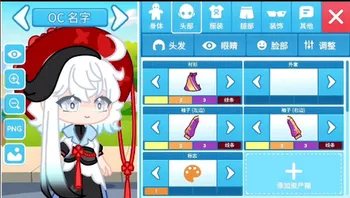 Chibimation UI
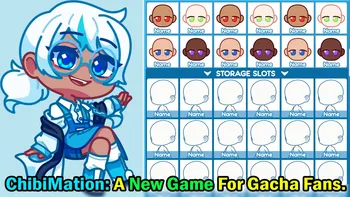 New Game
 Download
It is a game inspired by Gacha Life that will allow users to create different characters with a unique style thanks to the wide variety of elements such as clothing and accessories. Among these elements, there will be hairstyles, new facial expressions like eyes and mouths, all types of outfits, and accessories to complement them perfectly.
This new app, which will be available on all devices, is developed by PixelDream Labs along with two leading figures in the gacha community: Beowulf and FémLol Stúdió. These two gachatubers have come together to offer the community a game that includes everything the community has requested. Next, we will discuss some of the highlighted features of Chibimation.
Chibimation New Features
Chibimation, previously known as Gacha Designer or Gacha Creator, is a game with a Chibi aesthetic, as its name suggests. Additionally, the latter part of its name refers to Animation. This game offers more than 10.000 completely unique and original assets created by various designers from the gacha community.
Among these assets are all the necessary elements for a gacha-themed game, from hairstyles to extravagant tails, wings, clothes, and accessories to create the most creative and picturesque OCs. Moreover, the game features a new design for the character base, as well as new backgrounds and some extra features compared to other Lunime games.
The game continues in a way with the original idea of Gacha Shop, a store that allowed asset creators to share their creations with other users. This time, players will be able to add their own assets to the game, thus enjoying their own designs to dress up their characters.
Some of the main features of Chibimation include:
- Unique aesthetics.
- A Large Number of Assets.
- In-game search bar to find assets more easily.
- A wide range of colors to select from (without limitations).
- The possibility to import your own assets into the game.
- The possibility to import your own backgrounds into the game.
- Available on multiple platforms.
Video Review

Download Chibimation Apk for Android
Looking to dive into the creative world of Chibimation on your Android device? Follow these simple steps to download the Chibimation APK and start designing your unique chibi characters.
- Download the APK file.
- Enable Installation from Unknown Sources: Before installation, go to your device’s settings, select ‘Security’, and then enable ‘Unknown Sources’. This allows the installation of apps from sources other than the Google Play Store.
- Download and Install the APK: Click on the download link for the Chibimation APK. Once downloaded, open the file and install it on your device.
- Open the game and Start Creating: After installation, open the game and immerse yourself in the world of chibi character creation and storytelling.
Download Chibimation for Pc
Whether you’re on Windows or Mac, downloading and installing Chibimation directly onto your computer is straightforward, allowing you to enjoy a more immersive creative experience on a larger screen.
- Look for the download section specifically for PC users. Find options for both Windows and Mac, ensuring compatibility with your operating system.
- Click on the download link for the version compatible with your PC. Depending on your browser settings, you might need to confirm the download or choose a download location on your computer.
- Once the download is complete, locate the installer file in your download folder and double-click to start the installation process. Follow the on-screen instructions to properly install Chibimation on your PC.
- Launch and Enjoy: After installation, you can find the game in your Start menu or Applications folder. Launch it to dive into the expansive universe of chibi character design and storytelling right on your PC.
By following these steps, you can easily download and install Chibimation on your PC, unlocking a new level of creativity and enjoyment without the need for an Android emulator. Get ready to explore its rich features and unique aesthetic on a platform that offers greater control and a broader view of your creations.
Download Chibimation for iOS
iPhone and iPad users can look forward to bringing their chibi characters to life with Chibimation. With a few taps, you can download Chibimation and start exploring its extensive features:
- Open the App Store on your iOS device and use the search function to find “Chibimation.”
- Click the “Get” button to begin the download. You may need to enter your Apple ID password or use Touch/Face ID to authorize the download.
- Once downloaded, open the new app from your home screen and dive into the endless possibilities of character creation and storytelling.
Installation Guide: How to Install and Play on Pc, Android and iOS
Follow these steps to install Chibimation on your PC:
- Locate the Downloaded File: After downloading, find the Chibimation installer file in your computer’s default download location, usually the ‘Downloads’ folder. The file have an “.exe” extension for Windows or a “.dmg” for Mac users.
- Initiate Installation:
- For Windows: Double-click on the “.exe” file to open the installation wizard. If a security prompt appears asking for permission to run the installer, click “Yes” or “Run” to proceed.
- For Mac: Double-click on the “.dmg” file, which will open a new window. You might need to drag the Chibimation application icon to your Applications folder, following any on-screen instruction.
- Follow On-Screen Instructions: The installation wizard will guide you through the setup process. This typically involves agreeing to the terms of service, selecting an installation location, and choosing whether to create shortcuts. It’s recommended to accept the default settings if you’re unsure.
- Complete the Installation: Once you’ve followed all the instructions, the wizard will complete the installation process. If prompted, click “Finish” or “Close” to exit the setup. On some PCs, you might be asked to restart your computer to complete the installation successfully.
- Launch Chibimation:
- For Windows: Go to your Start menu, look for Chibimation in your list of installed programs, and click on it to open.
- For Mac: Open your Applications folder and double-click on Chibimation to start the application.
- Begin Your Creative Journey: With the new app now installed on your PC, you’re ready to dive into the world of chibi character creation and storytelling. Explore the vast array of unique and original assets, design your characters, and bring your stories to life.
Troubleshooting Tips: If you encounter any issues during the installation, ensure that your PC meets the minimum system requirements for Chibimation. Make sure your operating system is up to date to avoid compatibility issues. If the installation fails, try disabling your antivirus software temporarily, as it may mistakenly block the installer, then attempt the installation again.
FAQ
Below, you will find answers to some frequently asked questions by users about Chibimation:
Chibimation Release Date
The release date for Chibimation has been confirmed on various occasions, after having an estimated release date of mid-2024, it has finally been confirmed to launch in April 2024
Which Devices are Compatible?
Designed for versatility, Chibimation is being developed to enrich the user experience across iOS, Android, and PC platforms.
Is Chibimation a Gacha Mod?
No, Chibimation is not a gacha mod; it is a completely unique and independent application that will include a large number of innovations and improvements compared to Lunime’s applications.
How to Send Suggestions?
If you want to send suggestions for features to be added to the game, you can post your messages on the Discord server. Feedback will be taken into account to ensure the best possible user experience.
Finding the game on App Stores
The journey to launch Chibimation on app stores is still in progress, with the beta version not yet available. Future updates will shine a light on when and how to embark on the Chibimation adventure through legitimate channels.
Will the game be paid?
No, Chibimation will be completely free and accessible to everyone who wants to download it. However, it will have some premium in-game elements that can be acquired, such as the pass to import your own assets into the game, which will include a one-time payment that gives you access to this feature.
How to Support Chibimation
If you want to support the Chibimation development team, you can do so through donations on Ko-fi; this will allow both developers and asset designers to deliver the best results.
Is Chibimation Inclusive?
Pride in diversity guides Chibimation’s development, with a commitment to offering design elements that celebrate LGBTQ+ identities. This initiative reflects the application’s aim to foster an inclusive space for all storytellers.